Bulk Autofill
Autofill Pro includes a console workflow, control panel page, and extensible queue service for running an Autofill field across one or more existing entries. This is useful when you want to backfill content, refresh generated fields, or apply the same Autofill profile to a batch of entries.
Bulk Autofill uses the same field configuration, model configuration, prompts, and field adapters as the editor workflow. The important difference is that bulk runs apply normalized suggestions automatically, so it should be used carefully.
Bulk Calls from Control Panel
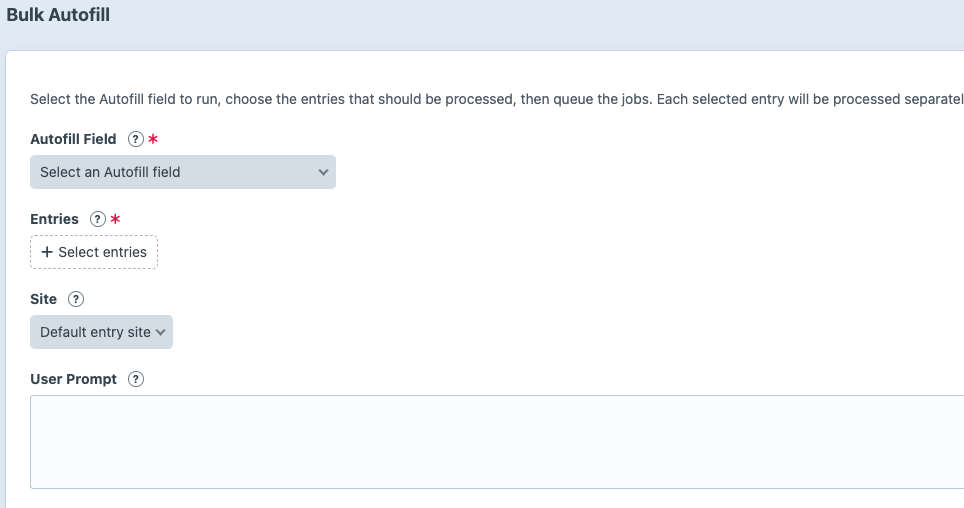
You can call on as many entries as you would like right from the craft control panel. Just pick the Autofill field you would like to call and the entries you would like to call it on to run an individual job for each. You can also optionally add a prompt to be passed to those runs as well as the site id for multi site support
Console Command
./craft autofill/bulk/run --field-slug=autofillProfile --entry-ids=10,11,12You can identify the Autofill field by field handle or field ID:
- --field-slug: the Autofill field handle
- --field-id: the Autofill field ID
Options
- --entry-ids: comma-separated entry IDs to process
- --site-id: optional site ID
- --user-prompt: optional text-based input to include in the generated prompt
What Happens
For each entry, Autofill builds the prompt, sends the request to the selected model, normalizes the generated suggestions, applies each suggestion to the entry, and saves the entry.
Because bulk runs do not pause for editor review, test the Autofill field on a small number of entries first. Use Test Mode and request logs to confirm the prompts and responses look right before running a larger batch.
Queue Service Extension
If you would like to extend autofill and call on a fields functionality in a more extensible way the service can be called from other plugins. For one of the sites I manage for example, it was desirable to call an autofill field after and entry is saved and enabled for the first time. This seemed quite niche to the sites that I work on so it was not added to the core plugin functionality. However it the sites you work with have a niche requirement, accessing the fields looks like this:
// Save Autofill plugin into variable.
$autofill = Craft::$app->getPlugins()->getPlugin('autofill');

// Stop if Autofill is not installed or enabled.
if (!$autofill || !method_exists($autofill, 'getBulkAutofillService')) {
    return;
}

// Get the bulk service into a variable.
$bulkAutofillService = $autofill->getBulkAutofillService();

// Queue a job for a specific Autofill field.
try {
    $bulkAutofillService->queueForEntry(
        $fieldId, // The field ID of the specific Autofill field.
        null, // Optional field handle/slug. Use null when passing a field ID.
        (int)$entry->id, // An entry ID with that field.
        (int)$entry->siteId, // Site ID.
        '', // Optional user prompt.
        'my-plugin' // Source label for logs/debugging.
    );
} catch (\Throwable $exception) {
    Craft::warning(sprintf(
        'Could not queue Autofill field %d for entry %d: %s',
        $fieldId,
        (int)$entry->id,
        $exception->getMessage()
    ), __METHOD__);
}