Supported Fields
Autofill uses field adapters to understand Craft fields, build useful prompt instructions, normalize AI responses, and apply generated values back to entries.
Supported fields appear in the target field and context field dropdowns after you choose an entry type scope for the Autofill field.
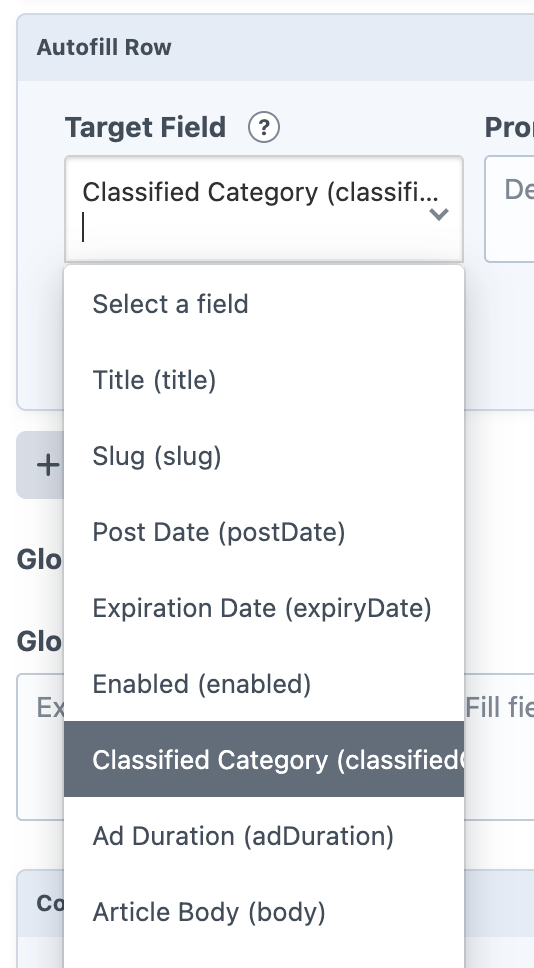
Native Entry Fields
- Title
- Slug
- Post Date
- Expiration Date
- Enabled
Supported Fields
- Plain Text
- Lightswitch
- Number
- Date
- Time
- Dropdown
- Checkboxes
- Multi-select
- Radio Buttons
- Color
- Country
- Button Group
- Icon
- JSON
- Range
- Money
- CKEditor
- SEOmatic
- Addresses (Pro edition only)
- Links (Pro edition only)
- Tables (Pro edition only)
- Categories (Pro edition only)
- Tags (Pro edition only)
- Entries (Pro edition only)
For relationship-style Pro fields, Autofill can include candidate options in the prompt so the model can suggest matching related elements. Some field types include extra settings to keep those candidate lists focused.