How to Import Content Into Craft CMS
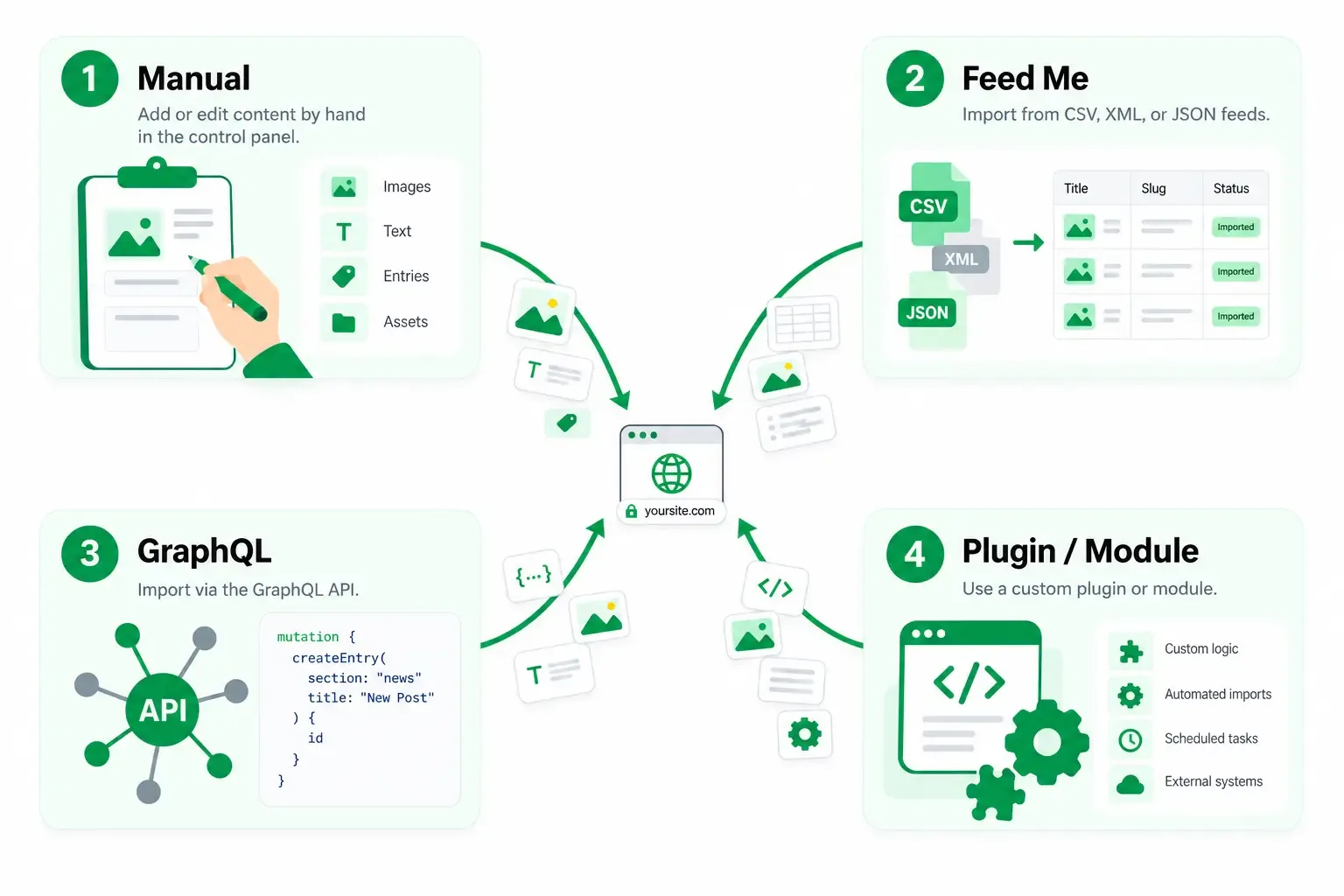
There are a few different ways to import content into Craft CMS, and the right one mostly depends on how much content you have, how clean the source data is, and how weird the logic gets once you actually start moving it.
For me, there are four main ways to think about it:
- Manual copy and paste
- The Feed Me plugin
- GraphQL
- A custom Craft plugin or module
If you are migrating from WordPress specifically, I also have a separate WordPress to Craft pre-migration checklist and a WordPress to Craft migration service. This post is more about the actual import methods.
Start With Structure
Before importing anything, I want to know what fields the content is actually going into.
That sounds obvious, but it is really the whole job. If the mapping is wrong, the import is wrong, even if the tool technically works.
A lot of the bulk content is usually images, text, dates, relationships, and HTML. Plain text fields are easy. Dates and times can get annoying fast because of formatting and timezone issues. Dropdowns, multi-selects, and anything structured need to be defined cleanly in Craft before you start. The nice thing is that with how flexible the content modeling is in Craft, this really isn't an issue once you understand what data needs to be imported.
The bigger mess is usually rich text. If content is going into a CKEditor field, a lot of what you are moving is really just HTML, and that is where old markup, inline images, and other junk tend to show up.
So the first step is always the same: understand the source content, build fields and entries to hold that content, and then pick the tool to get that content into those fields.
Manual Imports
Honestly, copy and paste is still the best option more often than people want to admit. And this is coming from someone who hates boring repetitive tasks.
If I am only dealing with 20 entries or fewer, or the content structure is so varied from page to page, I usually do not bother setting up a feed or building a custom importer. At that point, the setup time is often more work than just entering the content.
This is especially true when the content is messy or needs judgment calls while it is being brought over. If I am going to have to inspect and clean each entry anyway, manual entry is usually the simpler option.
Obviously, if you are reading a post about importing content into Craft CMS, you are probably hoping for something more advanced than that. But for small batches, manual entry is still a real answer.
Feed Me
The import tool I have used the most is Feed Me.
If you already have a clean feed, this is usually the easiest way to get a lot of content into Craft. My own experience has mostly been with JSON feeds, though Feed Me also supports CSV, XML, RSS, and Atom. For large amounts of content, a feed is usually going to be necessary.
Once the feed is in good shape, the import side is usually the easy part. Feed Me basically breaks down into two important parts: entry settings and field settings.
The entry settings let you define which elements the feed saves to, along with some very useful settings for how the feed should handle existing elements.
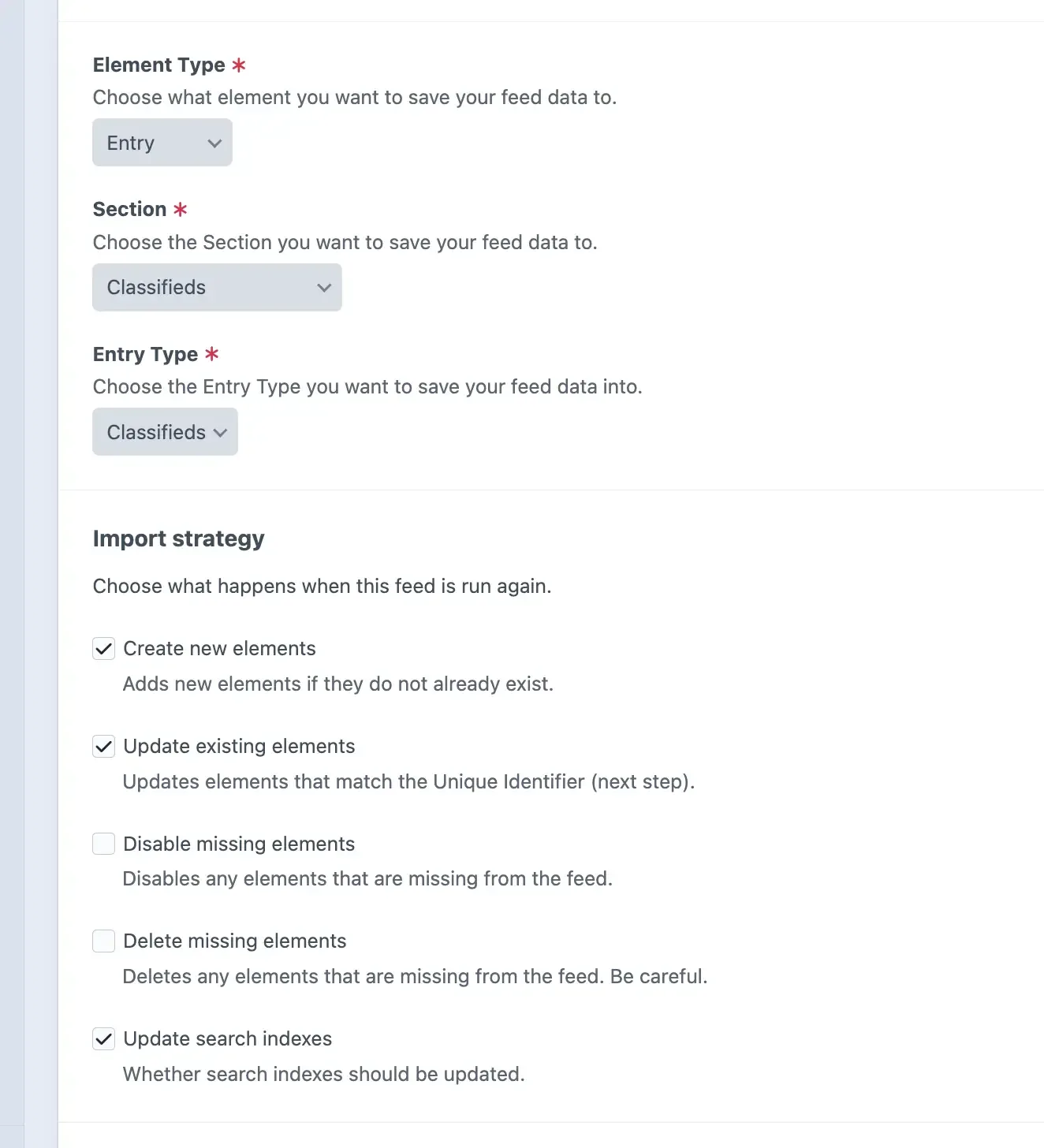
You define the feed, map the fields in the UI, decide when to skip things, and let it run. It handles pagination and a lot of the repetitive work for you. The plugin has quite a few options for how to handle each field individually as well. Things like images, dates, default values, and much more all work great.
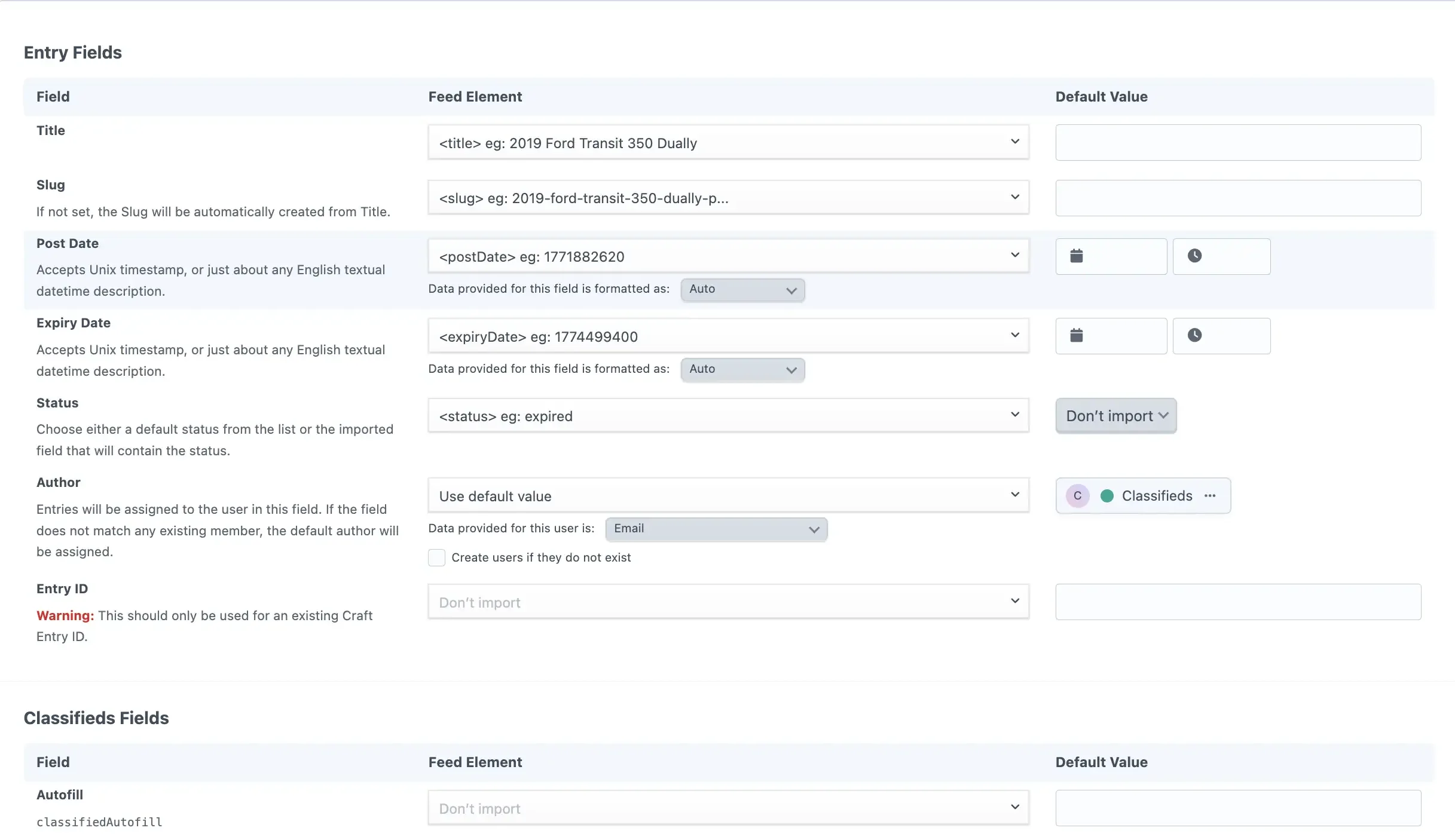
I have used it for a lot of larger migrations with thousands of entries, multiple entry types, and all kinds of content structures. In my experience, Feed Me is not usually the hard part. The harder part is getting the export into a shape that is worth importing. If you are moving content out of another Craft site or need a feed that stays current during a migration, see my guide on exporting content from Craft CMS. You should also include some kind of unique identifier for the old content, usually an ID of some kind. This is especially true if the content is subject to change as you are in the process of importing and reimporting as needed down the road.
There are still cases where I will import with Feed Me and then run custom cleanup after the fact, but if the source data is structured well, Feed Me is usually where I would start.
GraphQL
GraphQL is another good option, but I mostly use it for lower-risk jobs.
The way I think about it is that Feed Me is great when Craft is pulling from a feed, while GraphQL is great when something else is pushing structured data into Craft.
The main time I have used this is with an AI agent. I open the GraphQL endpoint, let the agent interact with the site, have it put content in, and then turn it back off when I am done.
For smaller batches, it is actually pretty slick. If I have 10 articles or some other low-risk content that I do not want to enter manually, it can save time. The downside is the same downside that exists with AI in general: you cannot count on perfect consistency every time.
If I am dealing with a real high-stakes import, I usually want something more repeatable and easier to verify.
Custom Code
Custom code is what I use when the other three options are not a good fit. It could be a custom Craft plugin, a module, or another one-off import layer depending on what the project needs.
Most of the time I have gone this route, it has been because the import logic is too complex for the previous options. A good example is rich text content with embedded images and old markup inside CKEditor fields. The content may technically import, but not in the form you actually want to keep.
One time, I needed to take inline images from imported content, turn them into real Craft assets, and then move them into embedded entries with the formatting I wanted. That meant writing custom jobs to identify the old markup, pull the images in-house, create the assets, and replace the content properly.
Another good use case is when you are importing from an API endpoint you do not control. Even if the data is simple, you may still need custom filtering, relationship handling, or transformation logic before it makes sense in Craft.
That is really when custom code becomes worth it. The problem is usually not “how do I import content into Craft.” The problem is “how do I import this specific content into Craft in the exact way I need.”
If that is the problem, custom code is usually the right answer. If you know that is the case and want help implementing this, feel free to see my Custom Plugin Service page.
Choosing the Right Tools
There is no single best way to import content into Craft CMS. The right approach depends on what the content looks like now, what it needs to look like in Craft, and how much work is required to get it from one place to the other.
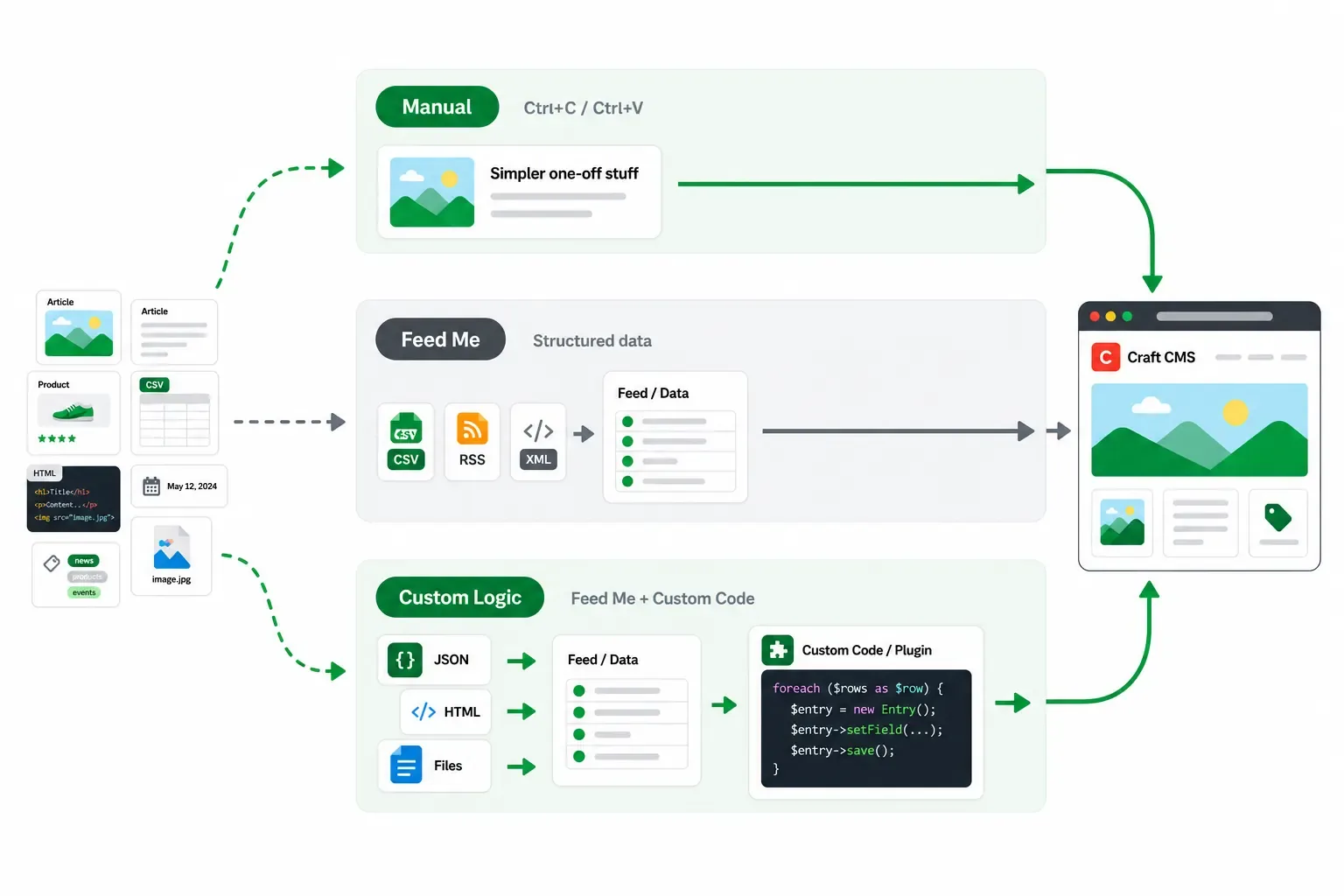
Sometimes one method is enough. Other times, the best approach is a combination. You might use Feed Me to bring in the bulk of the content, manual entry to clean up a few unusual entries, and custom code to handle embedded images or other content that needs to be transformed along the way.
Quick Comparison Table
| Method | Best fit | What it is good at | What to watch for |
|---|---|---|---|
| Manual entry | Small or inconsistent batches | Reviewing and cleaning content as you go | Does not scale well |
| Feed Me | Structured bulk imports | Handling repetitive work and large amounts of content | Requires a clean, well-mapped feed |
| GraphQL | Smaller programmatic imports | Pushing structured data into Craft | Requires more technical setup and verification |
| Custom code | Complex transformations or custom logic | Changing content into the exact structure you need | Takes more development time to build and maintain |
For smaller batches, manual entry is often still the fastest option, especially when every entry needs to be reviewed or cleaned up individually. If the content is structured and there is a lot of it, Feed Me is usually where I would start.
GraphQL can work well when another system or process needs to push content into Craft. For more complicated projects involving embedded images, old markup, relationships, or custom transformations, custom code may be the better fit.
The important thing is to understand the gap between the source content and the content model you are building in Craft. Once you know what needs to change between point A and point B, it becomes much easier to choose the right tools.
If you do need help with any form of migration, feel free to reach out.